
How AI Creates Captions from Song Lyrics
How AI Creates Captions from Song Lyrics
AI tools are transforming how song lyrics are turned into captions, making the process faster, more efficient, and highly accurate. Here's what you need to know:
-
Why Captions Matter:
- 69% of people watch videos without sound in public.
- TikTok videos with captions see a 55% increase in impressions and improve viewer comprehension by 38%.
- Captions boost accessibility for hearing-impaired audiences and non-native speakers.
-
How AI Works:
- AI isolates vocal tracks from music using stem separation.
- Automated Lyric Transcription (ALT) handles stretched vowels, rhythm variations, and complex pronunciations.
- Advanced tools like Whisper V3 achieve over 95% transcription accuracy and sync captions with word-level precision.
-
Benefits for TikTok Creators:
- AI-generated captions improve discoverability by helping TikTok's algorithm categorize videos.
- Tools offer customization options (fonts, colors, animations) and support translations for global reach.
- TikTok-ready formats ensure captions are optimized for mobile viewing, following best practices for music promotion on short-form video platforms.
-
Steps to Create Captions:
- Upload your audio or lyrics.
- Let AI generate captions and review for accuracy.
- Adjust placement, timing, and styling for TikTok.
Adding captions to music videos is essential for engagement, accessibility, and visibility on platforms like TikTok. AI tools simplify this process, allowing artists to focus on their music while reaching a broader audience.
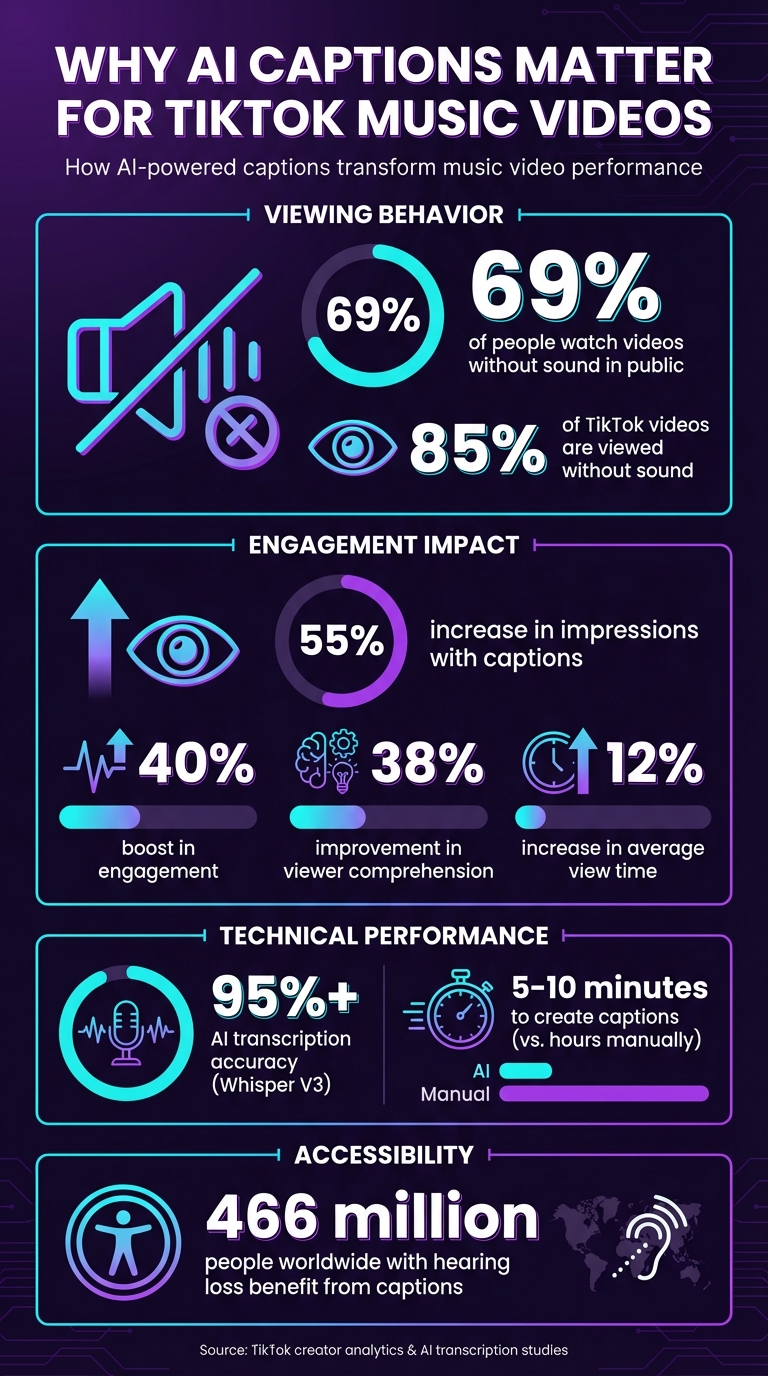
AI Caption Impact Statistics for TikTok Music Videos
How AI Converts Song Lyrics into Captions
AI has an impressive way of breaking down and syncing song lyrics into captions. It starts with stem separation techniques to isolate the vocal track from the instrumental. Even if you upload a full mix, the AI can create a clean acapella version, giving it a clear foundation to work with.
Once the vocals are isolated, the process moves to Automatic Lyric Transcription (ALT). As AudioShake Research explains:
"Automated lyric transcription is a different art from speech transcription, and one that requires a different approach... think of how often a singer might stretch out a word... or how a word might have a different pronunciation, cadence, or stress in order to fit the rhythm."
From here, the AI works on refining the transcription and aligning captions to the music.
Lyric Transcription and Audio Processing
Accurate transcription is key, especially for platforms like TikTok where captions need to be spot-on. The AI identifies stretched vowels, unique rhythms, and patterns in vocal delivery that set song lyrics apart from normal speech. Advanced systems like Whisper V3 can transcribe lyrics with over 95% accuracy, even across multiple languages. On top of that, the AI adds punctuation and adjusts formatting, ensuring captions are easy to read on smaller screens like smartphones.
Timing Alignment and Caption Positioning
Once the lyrics are transcribed, the AI uses word-level timestamping to perfectly sync each word or syllable with the music. As Laike.AI describes:
"Each word appears exactly when it's sung, not a beat early or late."
This precision comes from forced alignment algorithms, which match the text to the audio waveform. The captions stay locked to the rhythm, no matter how complex the song. The AI also identifies song structures - like intros, verses, and choruses - and organizes captions accordingly. During instrumental breaks or moments without vocals, the captions pause until the singing resumes.
Platforms like SoundRise take advantage of these cutting-edge AI tools to create TikTok-ready captions for artists, making it easier than ever to promote your music on TikTok with engaging and polished videos.
What AI Caption Tools Offer for Music Content
AI caption tools simplify the process of turning song lyrics into engaging TikTok videos. From transcription to visual design, they handle the technical details, making video creation both efficient and visually appealing. Here's a closer look at what these tools bring to the table.
Accurate Transcription and Auto-Sync
Using advanced models like Whisper V3, these tools excel at transcribing lyrics and syncing them with audio. They provide automatic alignment, but if you need to fine-tune the timing, manual adjustments are an option. For the best results, it's recommended to upload high-quality audio files, such as MP3 or WAV formats.
Caption Customization Features
These tools go beyond transcription by offering a range of visual customization options. You can tweak fonts, colors, and animations to match the mood of your music. Many tools include genre-specific styles and even support translations into various languages . Dynamic text animations, like word-by-word highlighting, add a lively touch that syncs perfectly with your vocals. A great example is Capify's work on the "Soweto" music video (Victony ft. Don Toliver, Rema & Tempoe), which has racked up over 15 million views thanks to its engaging auto-captioned visuals.
TikTok-Ready Export Formats
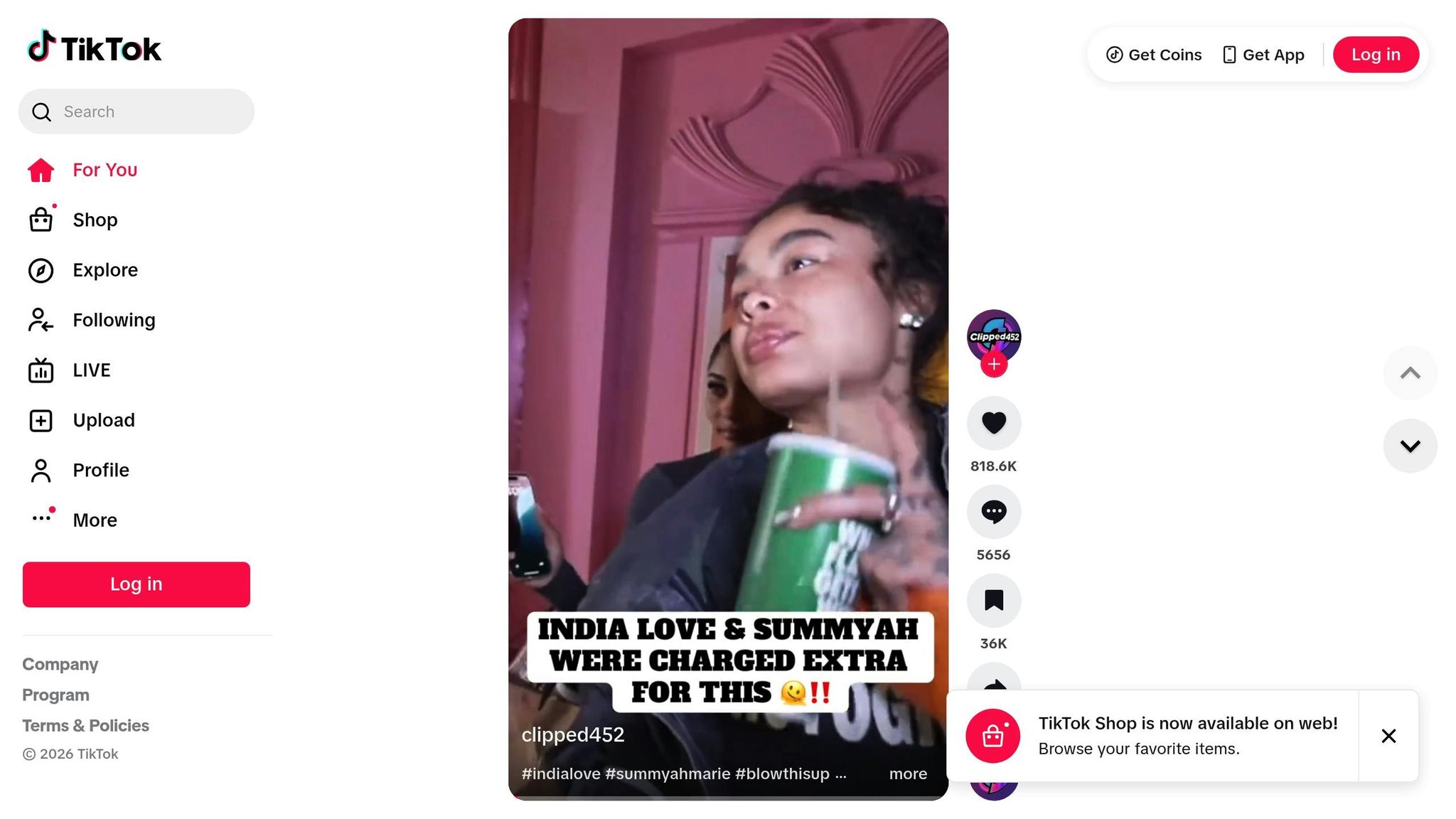
To ensure compatibility with TikTok, these tools automatically format videos in a 9:16 vertical layout with HD quality. This guarantees captions look sharp on mobile devices. Features like export presets and one-click sharing make it easy to post directly to TikTok. Some tools, like SoundRise, even offer burned-in captions with synchronized animations, along with options for automated posting and scheduling, helping artists streamline their TikTok content creation process.
How to Create Captions from Song Lyrics
Upload Your Song or Enter Lyrics
Start by uploading your audio file in formats like MP3, WAV, or MP4. Many platforms make this easy with drag-and-drop functionality. If you're using TikTok, simply tap the "+" icon and select "Upload" to pick a video from your device's gallery.
Prefer to work with the text directly? You can paste or type the song lyrics into the provided text box. Once you've uploaded your file or entered the lyrics, the AI quickly generates a draft of your captions.
Generate and Check Your Captions
The AI processes your audio to create captions automatically. While the system is efficient, it's important to review the results for accuracy. AI can sometimes misinterpret slang, technical terms, or lyrics that are difficult to hear due to heavy production effects. Careful review ensures your captions are correct.
If errors pop up, you can edit the transcript directly. Any changes you make update instantly. Pay extra attention to unique words or phrases that the AI might not recognize.
Adjust Captions for Your TikTok Video
Once you've verified the text, it's time to fine-tune your captions for TikTok. Place them in the center-bottom of the screen, steering clear of the edges where TikTok's interface might overlap. For better readability on mobile devices, stick to simple fonts like "Classic" or "Serif" and use high-contrast colors.
Syncing captions with your audio is just as important. Use timeline sliders to adjust the timing for perfect alignment. On TikTok, you can also tap the text, select "Edit duration", and match it precisely to the audio cues. Well-optimized captions not only make your video more accessible but also enhance its overall appeal.
sbb-itb-e87b2af
Tips for Using Captions in TikTok Music Videos
With AI tools handling caption generation, these tips can help you fine-tune your TikTok music videos for better engagement.
Make Captions Easy to Read on Mobile
To keep your captions clear and user-friendly, position them in the bottom-center or top-center of the screen. This avoids overlapping with TikTok’s interface. Use high-contrast text, like white on dark backgrounds, to ensure readability on smaller screens.
Keep your captions brief - stick to 5–10 words per line. Mobile screens don’t leave much room, so concise text helps viewers follow along effortlessly. If your video features multiple singers or speakers, try using different colors or labels for each voice. This makes it easier for viewers to distinguish between them. These simple adjustments make your captions more effective and viewer-friendly.
Match Captions to TikTok Trends
Grab attention right away by using captions that spark curiosity. For example, start with something like “Wait for the bridge…” to hook viewers in the first few seconds. This approach pairs well with trending sounds and keeps people watching. TikTok’s algorithm also analyzes caption text to understand your video’s context, so including a keyword or two early on can boost your chances of landing on the “For You” page.
Timing is everything. Sync your captions with specific lyrics, beat drops, or key moments in your video. This alignment not only enhances the viewing experience but also ties your content to trending sounds, increasing its appeal. Wrap things up with a call to action, like “Link in bio for full track” or “Tag a friend who needs this vibe,” to encourage interaction.
Improve Reach and Accessibility
Captions do more than just boost engagement - they also make your videos accessible to a wider audience. For instance, they help the 466 million people worldwide with hearing loss and non-native speakers understand your content. Plus, with about 85% of TikTok videos viewed without sound, captions ensure your message gets across even when the audio is muted.
Adding captions can lead to a 55% increase in impressions and an average 12% boost in view time. But don’t rely solely on AI-generated captions - proofread them before posting. Background music or heavy instrumentation can sometimes cause transcription errors, which might hurt your video’s professionalism. Taking the time to review your captions ensures they’re polished and effective.
Conclusion
AI-powered caption tools are changing the game for TikTok video creation by cutting down the time it takes to transcribe and sync captions. What used to take hours can now be done in just 5–10 minutes. This means independent artists can create lyric videos without breaking the bank on production costs.
Adding captions to your videos isn't just a time-saver - it makes a big impact. Captions can lead to a 55% increase in impressions and boost engagement by up to 40%. They also improve accessibility for viewers with hearing loss and help TikTok’s algorithm better understand your content, increasing its chances of reaching the right audience.
For musicians looking to simplify their workflow, AI tools are a game-changer. They automate audio transcription and caption syncing, freeing up more time to focus on the creative side of things. Platforms like SoundRise take it a step further by offering an all-in-one solution for music promotion. From video creation to scheduling posts, SoundRise helps you stay consistent and engaging on TikTok with features like automated posting and genre-specific customization.
Using AI for captions and video creation gives you an edge. It speeds up your process, helps you connect with a broader audience, and keeps costs low - all while letting you focus on what matters most: your music.
FAQs
How does AI create accurate captions for music videos?
AI generates precise captions for music videos by examining the song's tempo, beats, and structure. This allows the lyrics to sync perfectly with the music, ensuring the captions appear exactly when they should. The result? A smoother and more engaging experience for viewers.
Automating this task with AI not only saves time but also minimizes mistakes. This lets artists concentrate on their creative work while still delivering videos that look polished and professional.
What customization features do AI caption tools provide for TikTok videos?
AI caption tools come packed with customization options, giving TikTok creators the ability to make their videos stand out while staying true to their personal style. You can tweak font style, color, size, and alignment to fit your video’s vibe or align with your branding. Plus, many tools let you manually edit captions, so you can fine-tune the wording, fix errors, or adjust the tone for better impact.
Some of the more advanced tools take things further by offering multi-language support, which is perfect for reaching a broader audience. They also include handy features like automatic line breaks to keep captions readable and synced with the video’s audio. These features make it easier to create polished, accessible content that feels tailored to both your style and your audience’s needs.
How do AI-generated captions enhance TikTok video engagement?
AI-generated captions can play a big role in increasing TikTok video engagement. They make your content easier to connect with, more accessible, and simpler to find. On a platform where many users scroll with their sound off, captions allow viewers to quickly grasp your video’s message without needing audio.
Adding lyrics or playful text through captions can also inject personality into your videos, making them stand out and stick in people’s minds. This mix of accessibility and creativity helps you connect better with your audience, encouraging more likes, shares, and comments.