
5 AI Tools for Repurposing TikTok Content
5 AI Tools for Repurposing TikTok Content
Creating TikTok content is time-consuming, but limiting it to one platform means missing out on a larger audience. Repurposing your videos for Instagram Reels, YouTube Shorts, Facebook, and Pinterest can help you reach more people and grow your following with platform-specific strategies. However, doing this manually can take hours each week, leading to burnout. That's where AI tools come in - they automate tasks like removing watermarks, resizing videos, adding captions, and scheduling posts, saving you time and effort.
Here are five AI tools that can help you repurpose TikTok content efficiently:
- SoundRise: Great for musicians, it creates faceless videos with Pinterest visuals and automates TikTok scheduling. Plans start at $19/month.
- Opus Clip AI: Turns long videos into short clips with high engagement potential. Offers a free tier and paid plans starting at $15/month.
- Munch: Uses AI to extract and edit top moments from videos, adding captions and hashtags. Free plan available; paid plans start at $15/month.
- Repurpose.io: Automates multi-platform sharing, removing watermarks and resizing videos. Plans start at $35/month with a 14-day free trial.
- Captions AI: Focuses on TikTok editing and cross-platform repurposing. Pricing details are not disclosed.
Quick Comparison
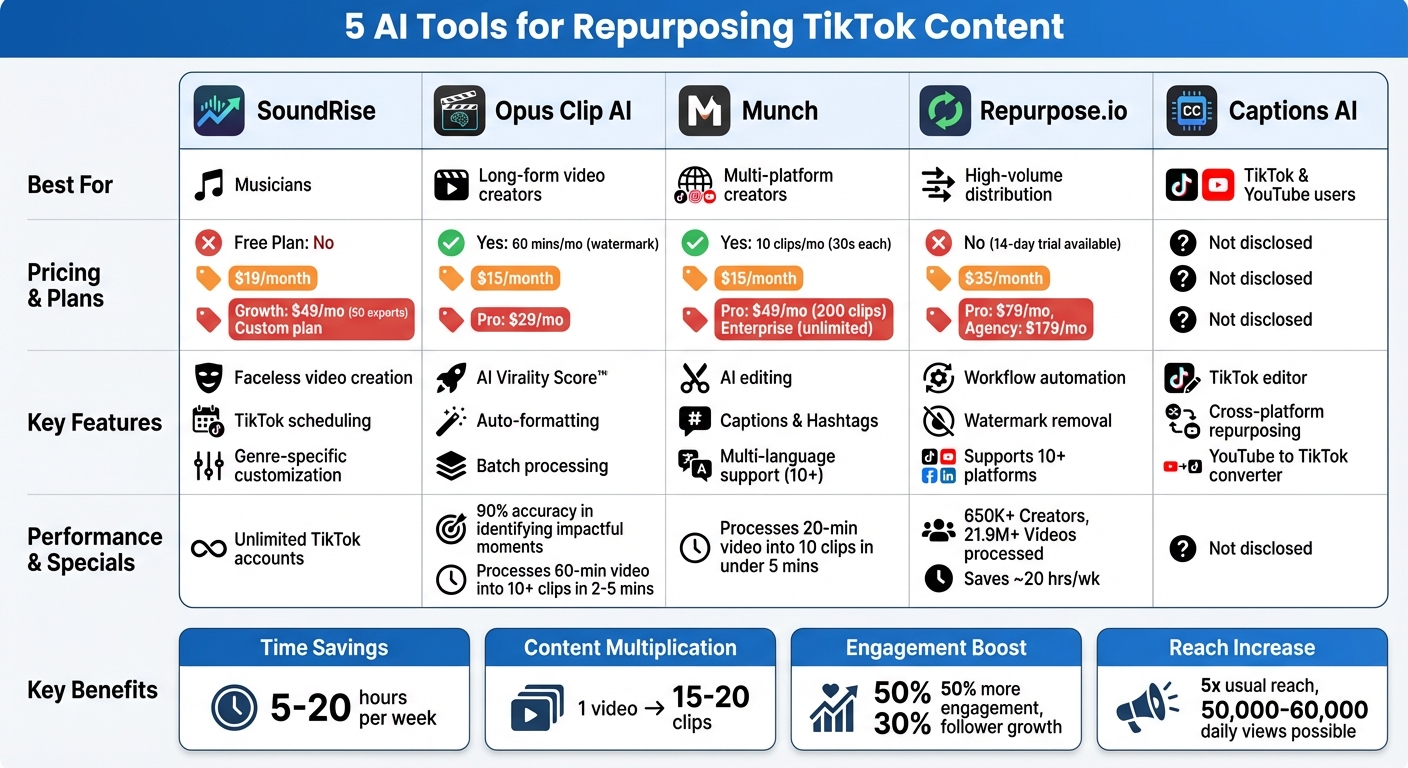
| Tool | Best For | Free Plan | Starting Price | Key Features |
|---|---|---|---|---|
| SoundRise | Musicians | No | $19/month | Faceless video creation, TikTok scheduling, genre-specific customization |
| Opus Clip AI | Long-form video creators | Yes | $15/month | AI Virality Score™, auto-formatting, batch processing |
| Munch | Multi-platform creators | Yes | $15/month | AI editing, captions and hashtags, multi-language support |
| Repurpose.io | High-volume distribution | No | $35/month | Workflow automation, watermark removal, supports 10+ platforms |
| Captions AI | TikTok and YouTube users | Not disclosed | Not disclosed | TikTok editor, cross-platform repurposing |
Each tool offers unique features for specific needs. If you're a musician, try SoundRise. For creating viral clips, Opus Clip AI is a solid choice. Need automation across platforms? Repurpose.io is your go-to. Start with the free plans or trials to see what works best for your workflow.
AI Tools for Repurposing TikTok Content: Features and Pricing Comparison
1. SoundRise
Music-specific features
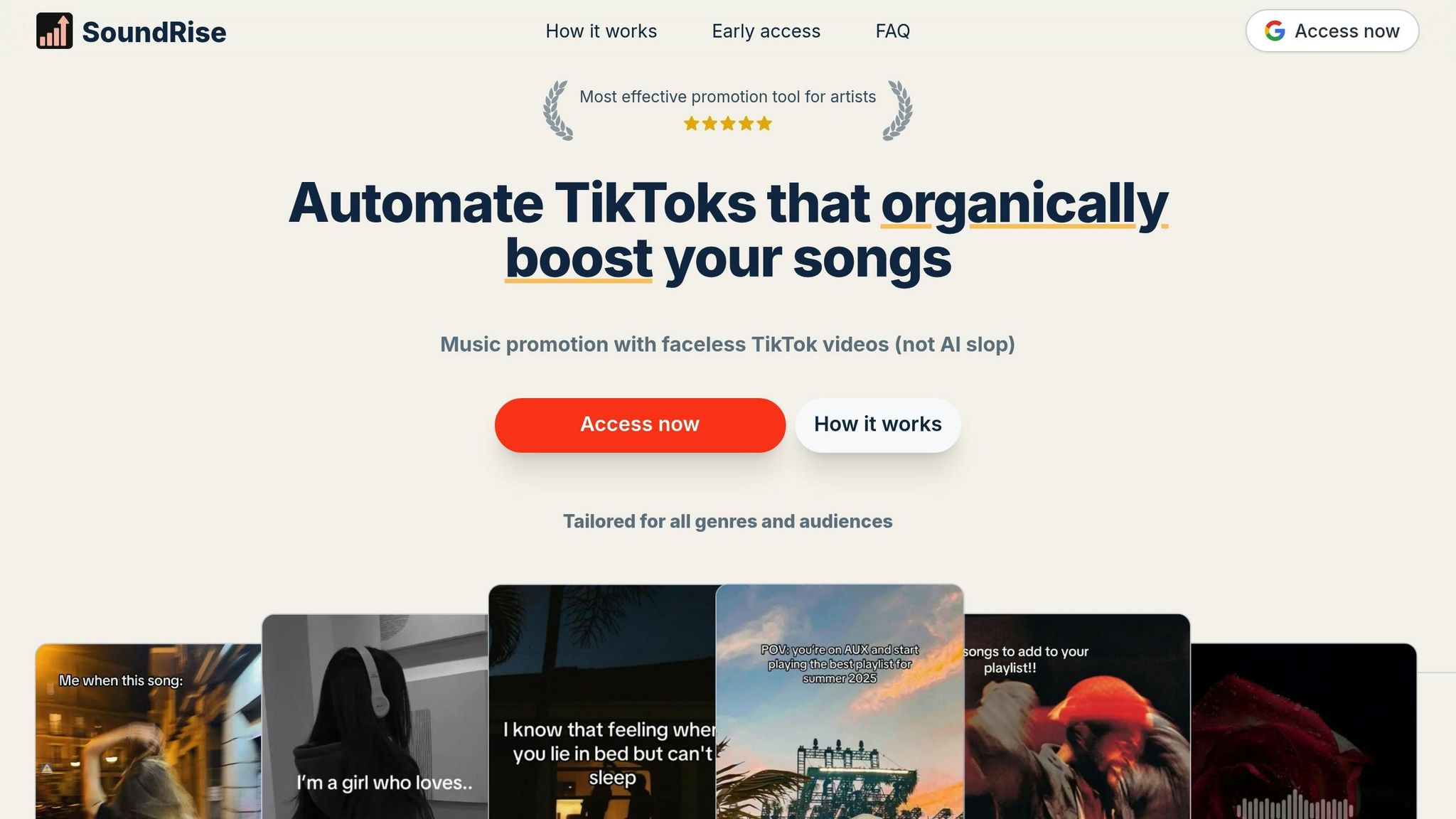
SoundRise is designed to help musicians create TikTok content with ease, even if they prefer to stay off-camera. Using AI, the platform crafts faceless video content in a slideshow format. It pulls visuals from Pinterest and pairs them with your music tracks, eliminating the need for filming or appearing on camera.
The platform also tailors video styles to fit specific music genres. Whether you're producing lo-fi, indie rock, or electronic music, the AI adapts to your sound. Plus, the content library provides inspiration, offering insights into what works for your genre so you’re never starting from scratch. These tools make the creative process smoother and more efficient.
Automated content repurposing
SoundRise streamlines your TikTok workflow by automating key tasks. Once your video is created, the platform can schedule and post directly to TikTok. You can connect unlimited TikTok accounts, making it a great option for managing multiple artist profiles or experimenting with different promotional strategies. The Growth plan ($49/month) includes features like direct publishing and advanced scheduling, giving you more control over your content calendar.
Platform compatibility
Although SoundRise is primarily focused on TikTok, it also supports cross-platform content repurposing. This allows you to extend your reach beyond TikTok while maintaining a consistent style. The platform prioritizes organic promotion, steering clear of fake plays or risky tactics that could lead to penalties, ensuring your account stays secure.
Pricing and scalability
SoundRise offers flexible pricing options to suit different needs. The Starter plan ($19/month) allows for 20 video exports, while the Growth plan ($49/month) offers 50 exports along with direct publishing. For larger teams or agencies, there’s a Custom plan available. All plans include unlimited drafts, full access to the content library, and the ability to add unlimited team members - ideal for collaborating with managers or promotional teams.
2. Opus Clip AI
Automated content repurposing
Opus Clip AI is designed to transform lengthy videos into shareable, bite-sized clips. By analyzing visuals, audio, and engagement metrics, it identifies the most impactful moments with over 90% accuracy. In just 2–5 minutes, it can break down a 60-minute video into more than 10 clips [18,20]. Each clip is scored with an AI Virality Score™, estimating its potential reach based on insights from thousands of viral videos. Take Grant Cardone Enterprises as an example - they managed to double their video output while cutting editing time in half. This streamlined process ensures your clips are optimized and ready for multi-platform distribution.
Platform compatibility
Opus Clip makes it easy to publish directly to TikTok, Instagram Reels, YouTube Shorts, Facebook, LinkedIn, and X. Its ReframeAnything AI feature automatically adjusts video formats - whether vertical (9:16), square (1:1), or landscape (16:9) - while keeping speakers centered. You can upload content directly in MP4, MOV, or WEBM formats or import it from platforms like YouTube, Google Drive, Vimeo, Zoom, and Twitch. While it's great for interviews and behind-the-scenes footage, it might not deliver precise cuts for music videos.
Pricing and scalability
Opus Clip offers a Free Forever plan, which includes 60 minutes of monthly processing but applies watermarks to clips. For more flexibility, the Starter plan ($15/month) provides 150 watermark-free minutes, and the Pro plan ($29/month) includes 300 minutes, a team workspace for up to 4 users, and a built-in social media scheduler. Larger teams can opt for custom Enterprise plans, which feature API access and unlimited user seats.
"It used to take days to create clips. Now it takes us minutes to create them." - Lewis Howes, Creator
Batch processing is another time-saver, allowing users to generate multiple clips at once and significantly speed up editing workflows. Plus, videos with AI-generated captions have been shown to hold viewers' attention 12% longer than those without.
3. Munch (Get Munch)
Automated content repurposing
Munch leverages advanced tools like GPT, OCR, and NLP to analyze your video's speech, text, and visuals while aligning them with current trends. This process automatically identifies high-impact "nuggets" of content. For example, a 20-minute video can be processed into 10 optimized clips in less than 5 minutes. The AI Video Editor takes care of smart-cropping, ensuring the main action stays in focus, and it also generates platform-specific captions and hashtags for TikTok, Instagram, YouTube Shorts, LinkedIn, and Twitter. From extraction and editing to captioning and scheduling, the entire process runs on autopilot.
Platform compatibility
Munch doesn't just stop at optimization - it seamlessly integrates with major platforms. It connects directly with YouTube and Twitch to access your long-form content and optimizes it for export to TikTok, Instagram Reels, and YouTube Shorts. The tool automatically adjusts aspect ratios and converts hashtags into video tags to boost discoverability. Munch Studio also customizes its approach to match your brand's voice, visuals, and values, ensuring consistency. With support for over 10 languages, including Spanish, German, Hindi, and Japanese, Munch helps you reach audiences worldwide.
Pricing and scalability
Munch offers flexible pricing plans to suit different needs.
- Free Plan: Includes 10 clips per month, each up to 30 seconds, with a watermark.
- Starter Plan: Priced at $15/month (or $12/month when billed annually), this plan provides 50 clips per month, up to 60 seconds each, with no watermarks and automatic captioning.
- Pro Plan: At $49/month (or $39/month annually), this plan offers 200 clips monthly, up to 120 seconds each, with advanced optimization features.
- Enterprise Plan: Designed for larger-scale needs, this plan includes unlimited clips up to 300 seconds, custom branding, and a dedicated account manager.
"I use Munch Studio on a daily basis because it keeps my socials active - and my growth on every platform has skyrocketed." - Rachel Pizzolato, Content Creator (2.3M Followers)
Munch simplifies workflows by replacing multiple tools like Canva, ChatGPT, and scheduling apps such as Buffer or Hootsuite, consolidating everything into a single platform. Whether you're a solo creator managing your own content or part of a team juggling multiple projects, Munch adapts to your workload and scales effortlessly.
4. Repurpose.io
Automated content repurposing
Repurpose.io takes the hassle out of extending your TikTok content's reach, making it easier to share across multiple platforms automatically.
With its workflow-based automation, you can set TikTok as your source and choose destinations like Instagram Reels or YouTube Shorts. Once set up, the tool detects new TikTok uploads, removes watermarks, resizes videos to match platform dimensions, and distributes them automatically. Enable the Auto Publish feature, and your TikTok videos will instantly appear on all connected platforms, saving you time and effort.
Over 650,000 creators trust Repurpose.io, which has processed more than 21.9 million videos. Users frequently report saving up to 20 hours a week on cross-platform posting, with some seeing up to 50% more engagement and a 30% growth in followers. It’s no wonder so many creators rely on this tool.
As Molly Mahoney, a Digital Marketing Strategist, shares:
"Not only does it allow me to seamlessly turn one video into over 15 pieces of content, it will then publish the content automatically, saving me and my team hours every week."
Platform compatibility
Repurpose.io integrates with leading platforms like TikTok, Instagram, YouTube, and Zoom for content sourcing. For distribution, it supports Instagram Reels, YouTube Shorts, Facebook Reels, Threads, Snapchat Spotlight, Pinterest, LinkedIn, X (Twitter), and even audio platforms like SoundCloud. With official API connections, you don’t need to share passwords, ensuring secure usage. As of late 2025, it also supports automated repurposing for Instagram, Facebook, and Snapchat Stories. Additionally, musicians can convert TikTok videos into podcast audio or upload them directly to SoundCloud.
Pricing and scalability
Repurpose.io offers flexible pricing plans to suit different needs:
- Starter: $35/month (or $349/year) for 3 accounts and up to 5,000 videos monthly.
- Pro: $79/month (or $790/year) for 10 accounts with unlimited videos.
- Agency: $179/month (or $1,790/year) for 25 accounts with unlimited videos.
A 14-day free trial is available, and no credit card is required to get started.
Doc Williams, Founder of Brand Factory Inc, highlights its impact:
"Without Repurpose.io, I would never have been able to grow my audience the way I have. It has changed my entire workflow and the way I do business."
sbb-itb-e87b2af
5. Captions AI
Automated content repurposing
Captions AI simplifies the process of reusing your TikTok videos with tools like Repurpose AI and a dedicated TikTok Video Editor. These features are designed to make your content workflow smoother and more efficient.
The platform's repurposing capabilities allow you to quickly adapt your TikTok videos for other platforms without the hassle of manual adjustments. By automating tasks like format and specification changes, Captions AI saves you time and effort, letting you focus on creating instead of editing.
Platform compatibility
Captions AI bridges YouTube and TikTok with its YouTube to TikTok converter, which transforms long-form YouTube content into shorter, TikTok-friendly videos. This feature complements the usual TikTok-to-other-platforms repurposing, offering greater flexibility in managing content across channels.
The TikTok Video Editor is tailored for creating content that fits seamlessly into TikTok's unique style and feed. This ensures your repurposed videos keep the platform’s distinctive look and feel, helping to maintain strong engagement.
Pricing and scalability
Captions AI hasn’t disclosed its pricing details. For the latest information on plans and pricing, check their official website.
Smartest Ways to Repurpose Content with AI in 2025
Feature and Pricing Comparison
Choosing the right tool depends on your specific needs and budget. Here's a quick breakdown of key features and pricing:
- SoundRise: Designed for TikTok creators, this tool starts at $19/month. It offers automated posting and customization based on music genres, making it a great fit for TikTok-focused strategies.
- Opus Clip AI: With a free tier and paid plans starting at $15/month, this tool uses AI to identify and score the most engaging moments from longer videos.
- Repurpose.io: Ideal for creators handling large volumes of content, it automates workflows across multiple platforms. Plans include:
- Podcaster: $15/month
- Content Marketer: $25/month
- Agency: $125/month
Plus, it offers a 14-day free trial to test its features.
- Munch: Pricing details are not disclosed.
- Captions AI: Visit their website for pricing information.
Each tool caters to different priorities. SoundRise focuses on TikTok-specific features, like genre-based customization. Opus Clip specializes in AI-driven tools to find shareable video moments. Repurpose.io stands out with its ability to automate content distribution across 10+ platforms.
If you're working with a tight budget, Opus Clip's free tier is a solid starting point. For TikTok creators, SoundRise's Starter plan offers excellent value for consistent posting and scheduling. Meanwhile, Repurpose.io's Podcaster plan is perfect for creators who need seamless multi-platform distribution. These tools provide a range of options to help creators save time and maximize their content's reach.
Conclusion
AI tools are reshaping how musicians distribute their content, making workflows faster and more efficient. By cutting manual editing time significantly - saving creators between 5 and 20 hours each week - these platforms allow artists to focus more on their craft.
The "create once, publish everywhere" approach is a game-changer. A single 60-minute performance can be transformed into 15–20 short clips, perfect for daily posting. This strategy not only keeps content fresh but also aligns with algorithms that reward consistency, leading to impressive results. Some creators have reported seeing 50,000–60,000 daily views, achieving up to five times their usual reach after adopting AI workflows.
Several tools stand out for their specialized features. SoundRise simplifies TikTok scheduling, while Opus Clip uses AI scoring to pinpoint viral moments. Repurpose.io handles multi-platform distribution seamlessly. For those looking to create engaging clips with captions, Munch and Captions AI offer targeted solutions.
To get started, focus on your biggest content bottleneck. For example, if maintaining a consistent TikTok presence is your challenge, SoundRise's automated scheduling could be the answer. If you're sitting on hours of unused long-form content, try Opus Clip to unlock its potential with AI-driven clips. The goal is to treat your content as a reusable asset, not as isolated projects for each platform.
Once you've chosen the right tool, let AI handle the heavy lifting. Batch-process your videos, automate distribution, and free up your time to focus on what matters most - making music.
FAQs
How do AI tools help save time when repurposing TikTok content?
AI tools make it easier and faster to repurpose TikTok videos for other platforms by automating tasks such as resizing, adding captions, and editing. With these tools, creators can quickly adjust their videos to fit formats like YouTube Shorts or Instagram Reels, cutting down on hours of manual effort.
Some platforms go even further by managing the entire process. They can remove watermarks, trim clips, and even schedule posts across multiple channels. This level of automation frees up creators to focus on producing fresh content while ensuring their videos are tailored for better engagement on various platforms.
What features should I look for in an AI tool to repurpose TikTok content?
When picking an AI tool to repurpose TikTok content, focus on features that streamline the process and save you effort. Look for automation tools that handle scheduling and posting to platforms like YouTube Shorts or Instagram Reels. Also, prioritize editing capabilities such as trimming, adding captions, or removing watermarks - these ensure your content is polished and ready for each platform.
Some tools even use AI to pinpoint key moments or generate clips from longer videos, making it easier to craft engaging, platform-specific content. A simple, intuitive interface and compatibility with various media formats are also crucial for flexibility and ease of use. Together, these features can help you expand your content's reach while cutting down on the time spent on manual tasks.
How do AI tools adapt TikTok content for other platforms?
AI-powered tools make repurposing TikTok content a breeze by automatically tweaking videos to fit the specific requirements of various platforms. They take care of tasks like resizing, cropping, adding captions, and reformatting, ensuring your content is ready for platforms like YouTube Shorts, Instagram Reels, and others.
These tools often come packed with handy features such as auto-captioning, aspect ratio adjustments, and even automatic publishing. This means creators can save time while keeping the quality intact. With AI, adapting TikTok videos for a wider audience across multiple platforms becomes a quick and hassle-free process, eliminating the need for tedious manual edits.